Earlier this year, Avela surveyed over 500 families about their school enrollment experience. We asked about 20 questions covering how families research schools, where they get frustrated, and what parts of the process they wish were different. The goal was to understand the parent perspective so we could build a better platform — and give schools the insight to build better experiences.
What came back was illuminating. And a little surprising.
The Gap Between “Easy” and “Stress-Free”
More than 80% of the families surveyed said their enrollment experience was easy. On the surface, that sounded like good news. But when we dug deeper, those same families had plenty to say about where things could be better: technology that wasn’t mobile-friendly, unclear communication, having to submit the same paperwork multiple times, and more.
The lesson isn’t that everything is fine. It’s that “easy” and “stress-free” are not the same thing. Families will push through friction without labeling the experience a failure—but that friction is still costing schools applicants.
Charter Enrollment Is Increasingly Won or Lost Digitally
One of the clearest findings in the data: charter families are more research-driven than network-driven. While district school families largely rely on word of mouth, charter families are doing their homework online—comparing schools, reading websites, evaluating fit before they ever speak to anyone at a school directly.
What that means practically: your website isn’t just a marketing asset. It’s part of the enrollment experience itself. If a prospective family lands on your homepage and can’t quickly find what makes your school different, or can’t locate the apply button without hunting, they may move on before ever submitting an application.
Try this: put yourself in the shoes of a brand-new parent visiting your site for the first time. Where’s the apply button? What’s the first thing you see? Is it a wall of text, or does it clearly communicate who you are and what you offer? That exercise alone can reveal a lot.
Show Your Academic Outcomes—Don’t Just Claim Them
Academic performance was the number one driver for charter families in our survey, cited by over 70% of respondents. Families choosing a charter school are making an active decision, and they want evidence it’s worth it.
That means showing, not telling. Instead of a tagline about academic excellence, put your actual outcomes somewhere prominent and easy to find—test scores, graduation rates, college placement data. Make it concrete and make it visible.
A fun example: One school I came across had built an interactive map on their website called “Where Are They Now?”, showing where graduates had gone after leaving the school, including colleges and opportunities abroad. It was a simple, compelling way to let outcomes speak for themselves. Families got it immediately.
There’s also a practical AI benefit here. As more families use AI tools to research and compare schools, those tools are pulling specific metrics from websites to surface in answers. Concrete outcome data on your site helps families understand you and helps AI represent you accurately.
Make the Whole Process Mobile-Friendly
Families are starting applications on their phones—and abandoning them when the process forces a switch to desktop to finish. If your enrollment process isn’t fully functional on a mobile device from start to finish, you’re losing applicants at a preventable point.
Walk through your entire application flow on your phone. Where does it break down? Where would a busy parent on the bus give up and put their phone away? The schools that close that gap will see it reflected in their application completion rates.
Where to Start
The families we surveyed are telling schools exactly what they need. They’re doing research—make sure your website meets them there. They care about academics—show the proof. They want a clear, low-friction process—audit it and simplify it.
None of this requires a massive overhaul. Start with one thing. The schools that do will be better positioned for every enrollment season that follows.
Frequently Asked Questions
Why do charter school families research schools online more than district families?
Charter families are actively choosing a school rather than defaulting to a neighborhood assignment. That active decision-making drives more independent online research—comparing options and evaluating fit before ever contacting a school directly. Avela’s survey found that online research slightly outpaced friends and family recommendations as the top information source for charter families, while word of mouth remained dominant for district school families.
What is the most important thing on a charter school’s website for prospective families?
Clarity and ease of navigation. Charter families are researching your school before they ever reach out, and if they can’t quickly find what makes your school different or locate the apply button, they may move on without applying. Your website is part of the enrollment experience itself—not just a marketing tool.
How should charter schools communicate academic outcomes online?
With specifics, not slogans. Put concrete metrics—test scores, graduation rates, college placement data—somewhere prominent and easy to find. Interactive elements like graduate outcome maps can make the data more engaging. Specific metrics also benefit schools in AI-assisted searches, where tools pull data points to answer families’ questions about school quality.
Why does mobile-friendliness matter for charter school enrollment?
Families are starting and often trying to complete applications on their phones. When the process requires switching to a desktop to finish, application abandonment increases significantly. A fully mobile-friendly enrollment process—from the website through to application submission—reduces that drop-off at a preventable point.
Alex Weitzel is the Marketing Manager for Avela. Avela’s end-to-end enrollment management system is used by K-12 districts and charter schools nationwide, covering everything from school discovery and applications to lotteries, waitlists, and registration.
If you’ve spent time building out your school’s brand—nailing down your colors, getting a logo you’re proud of, launching a clean and professional website—first of all, that work matters. Branding gives families a way to recognize you. It establishes tone and credibility. It says: we have it together.
But here’s what I’ve seen over and over again working in school marketing: a school can have all of that and still struggle to get families to engage, apply, or choose them.
The reason? Branding tells people who you are. Storytelling makes them feel it. And feeling is what actually drives enrollment.
What Storytelling Really Means
When I talk about storytelling in school marketing, I don’t mean writing longer captions or posting more often. I mean creating content that answers the question families are actually asking when they visit your website or scroll your Instagram: What does it feel like to be part of this community?
That question doesn’t get answered by a logo. It gets answered by the photo of two kids laughing at a lunch table. By the “About Us” page that explains not just what you do but why you started. By the social media post that feels less like an advertisement and more like a page out of a yearbook.
Branding and storytelling aren’t opposites—they work together. But if you’re only investing in one, invest in the story.
Authenticity Over Polish
Here’s something I want to push back on a little: the idea that everything needs to look perfect before you can post it.
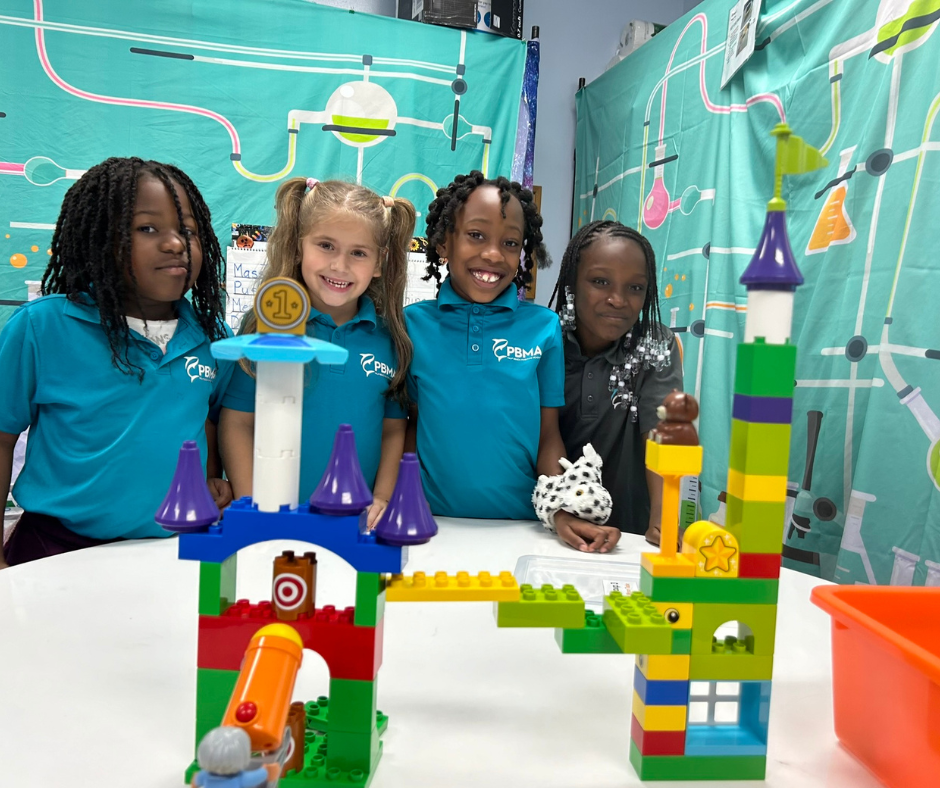
I’ve talked to school marketing staff who put content on hold because they didn’t have professional photos yet. I get the instinct. But what families are actually responding to isn’t perfection—it’s authenticity. A candid shot taken on an iPhone of students genuinely engaged in a project will outperform a glossy stock photo almost every time. Why? Because people can feel the difference between a moment that was captured and a moment that was staged.
When everything on a school’s social media looks too polished, I’ve actually heard families wonder: Where is all that money coming from? That’s not the question you want them asking. You want them thinking: I can see my kid here. This feels like a place we’d belong.
Students Are Your Best Storytellers
One of the most underused storytelling tools schools have is their own students—especially at the high school level.
Think about it: your students are digital natives. They understand short-form content, they know what resonates on social media, and they have authentic voices that no marketing team can replicate. Some schools are starting to formalize this through elective classes where students learn to create content, develop story arcs, and produce social media assets that the school actually uses.
This approach does two things at once: it gives your school a stream of genuine, student-generated content, and it gives students real-world skills in communications, marketing, and media. That’s a win worth pursuing.
Even outside of a formal class structure, there are simple ways to involve students—social media takeovers, student spotlights, short video testimonials filmed on a phone. The bar for production quality is lower than you think. The bar for authenticity is high.
Meeting the “New Scroller”
Social media has changed. Attention spans are shorter. The competition for eyeballs is fierce. If your content doesn’t capture someone in the first two seconds of a scroll, you’ve already lost them.
That means your storytelling has to adapt. Here’s what that looks like in practice:
Lead with the moment, not the message. Don’t start a video with your logo or a title card. Start with something that makes someone stop scrolling.
Keep it short. If you can say it in 30 seconds, don’t say it in two minutes.
Make it feel real. Informal, candid, and conversational content consistently outperforms high-production content in terms of engagement.
Don’t just promote—document. Show what’s actually happening in your school on a given day. That’s the story families want to see.
Where to Start If You’re Resource-Constrained
I know that most school marketing teams are small, often wearing multiple hats, and working with limited budgets. So if you’re reading this and thinking this sounds great but we don’t have bandwidth for all of it, here’s my honest advice: start with one thing.
Pick one channel—probably Instagram or Facebook—and commit to posting content that shows real moments from your school at least a few times a week. Use your phone. Don’t wait for perfect photos. Let students help. Respond to comments. Make it feel like a community, because that’s exactly what you’re trying to build.
The schools that are winning on storytelling right now didn’t get there by launching a perfect strategy all at once. They got there by showing up consistently, with heart, and letting their community speak for itself.
That’s a story worth telling.
Byron Flitsch is a member of the Grow Schools enrollment marketing team, helping charter schools grow through strategic, authentic marketing. Learn more at growschools.com.
FAQ
What’s the difference between school branding and school storytelling?
Branding gives your school a recognizable identity — your logo, colors, and overall look. Storytelling is what makes families feel something about your school. Branding tells people who you are; storytelling shows them what it’s like to be part of your community. Both matter, but storytelling is what ultimately moves families from awareness to enrollment.
How can a school with a small marketing budget start using storytelling?
You don’t need a big budget or professional photography to get started. Pick one social media channel — Instagram or Facebook — and commit to posting a few times a week using real moments from your school. Use your phone camera, involve students, and focus on authenticity over polish. Candid, genuine content consistently outperforms staged or highly produced posts when it comes to building trust with prospective families.
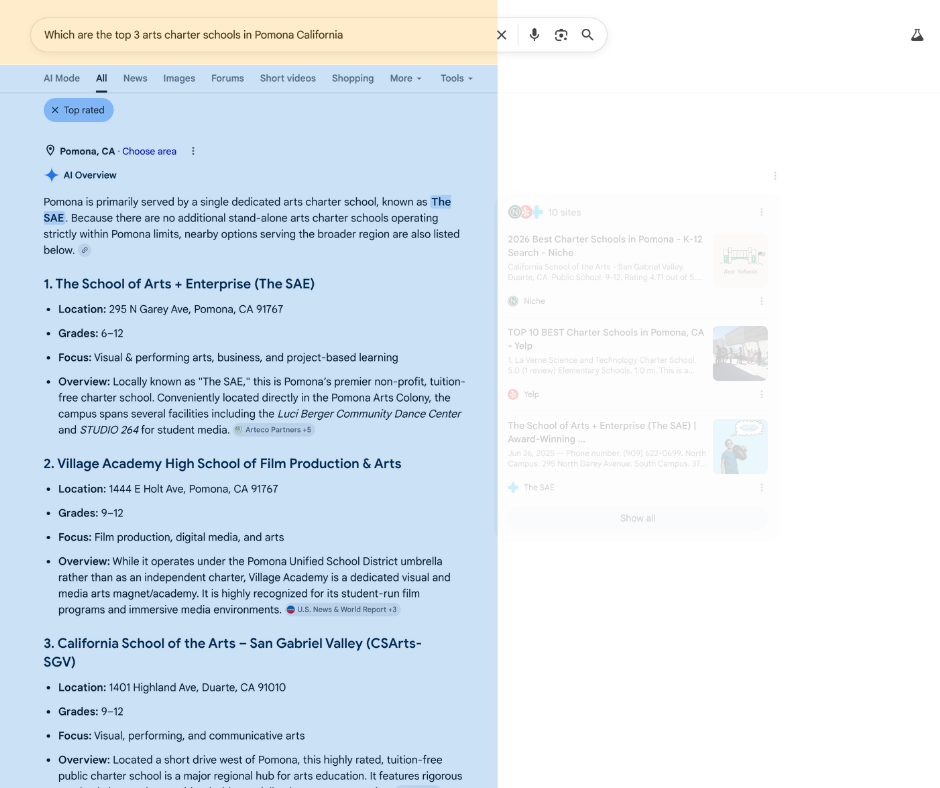
When a family searches “best STEM charter schools near me,” where does your school appear in the results?
More importantly: does it appear at all?
For many schools, the answer is no—not because the school isn’t great, but because search engines and AI systems don’t have enough structured information to understand what the school is, where it’s located, what it specializes in, or when events are happening.
That’s where schema markup comes in.
Schema markup sounds technical (because it is code), but the concept is simple: it’s a standardized way to tell Google, Bing, and AI search engines exactly what your school is and what information matters most. Instead of forcing search engines to crawl your entire website and make educated guesses, you’re providing them with precise, structured data.
In the AI-driven search world, this has become critical for discoverability.
What Is Schema Markup?
Schema markup is a small piece of code you add to your website that helps search engines understand the meaning of your content. Think of it as labels for different pieces of information on your site.
Without schema markup, Google sees a webpage with text, images, and links. It has to parse all of that unstructured information and try to figure out what your school is, where you’re located, what grades you serve, and what makes you unique. It’s slow and often inaccurate.
With schema markup, you’re saying: “This is the name of my school. This is our address. These are the grades we serve. This is what we’re known for.”
Instead of Google guessing, you’re telling it directly.
Why Schema Markup Matters Now (More Than Ever)
Schema markup has always been important for SEO, but AI has changed the game.
In the past, people searched using short keywords: “charter schools near me” or “STEM schools.” Search engines had to match keywords to websites.
Now, people search using full sentences: “What is the best charter school that focuses on STEM near me?” or “When is the open house for [school name]?”
AI search tools like Google’s AI Overviews and other AI-powered search engines answer these questions by pulling structured data from websites. If your school has schema markup, the AI can find the exact information it needs and include your school in the answer. Without it, your school is invisible to AI search.
As Niki explained: “The way that AI tools are pulling answers is by going through chunks of information. You want to make sure that’s accurate.”
If you don’t tell search engines what your school is, they might get it wrong—or miss you entirely.
The Three Types of Schema Markup Schools Need
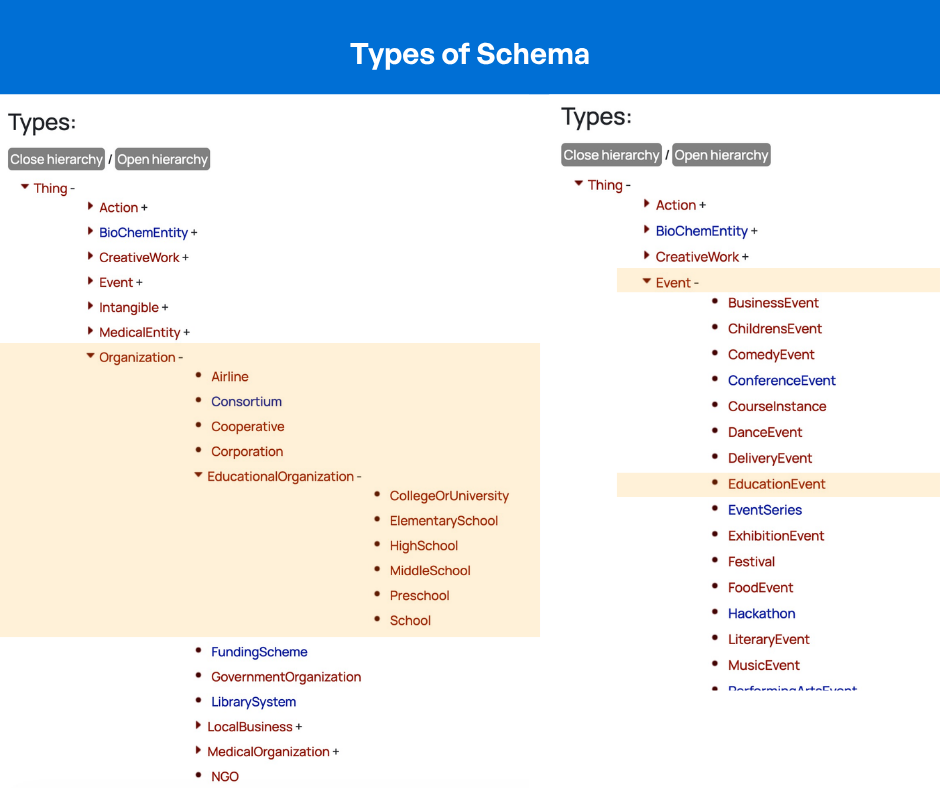
There are hundreds of different schema types, but schools should focus on three:
1. School Schema
School schema is your foundation. It tells search engines: “This is a school, and here’s what you need to know about it.”
School schema includes parameters like:
School name: The official name of your school
Website URL: Where to find more information
Logo URL: How to identify your school visually
Contact person: Who families should reach out to
Address: Your physical location
Grades served: Kindergarten through 12th grade, or specific grades
Knows about: What your school specializes in (STEM, arts integration, dual language, project-based learning, etc.)
The “knows about” field is particularly powerful because it’s where you define your school’s focus. This is how you connect to searches like “STEM charter schools” or “arts-focused schools in my area.”
School schema is the minimum any school should implement. It ensures that basic information about your school appears accurately in search results and knowledge panels.
2. Organization Schema
Organization schema is the parent structure of School schema. It provides broader organizational information like:
Year established
Leadership (CEO, principal, etc.)
Organizational structure
Multiple school locations (for networks)
Additional business information
For single-school charters, School schema is usually sufficient. For charter networks with multiple campuses, Organization schema helps Google understand the relationship between the network and individual schools.
3. Event Schema
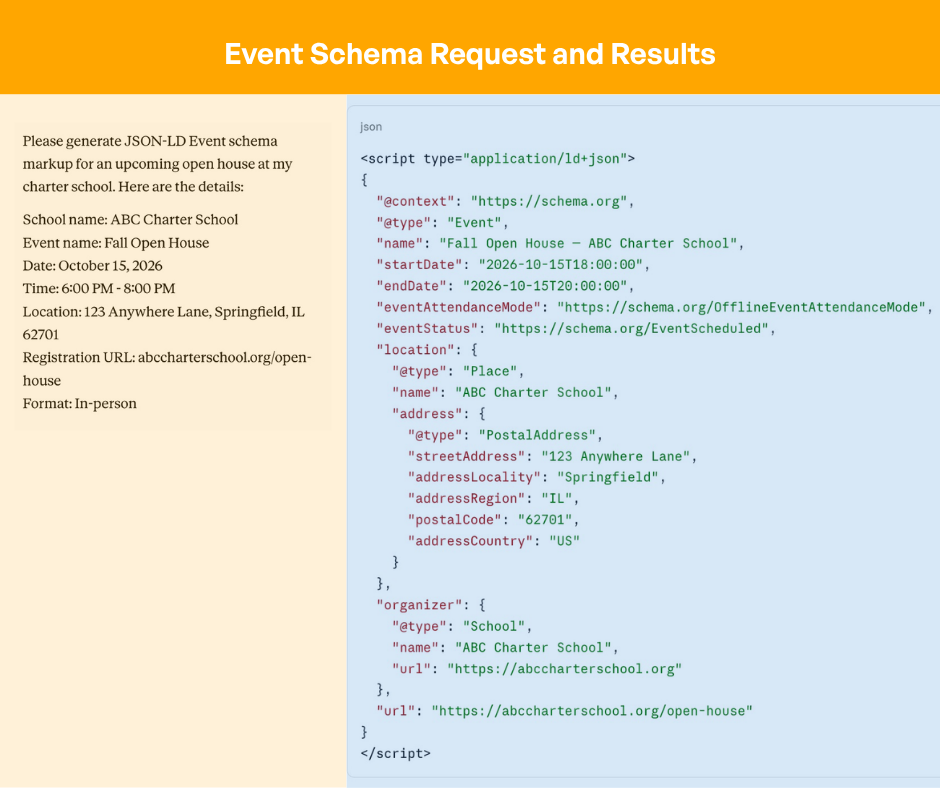
Event schema tells search engines about specific events happening at your school with precise details:
Event name: “Fall Open House” or “Enrollment Information Night”
Date and time: When the event happens
Location: Physical address or virtual meeting link
Registration/ticketing: How to sign up or register
Virtual or in-person indicator: Which format applies
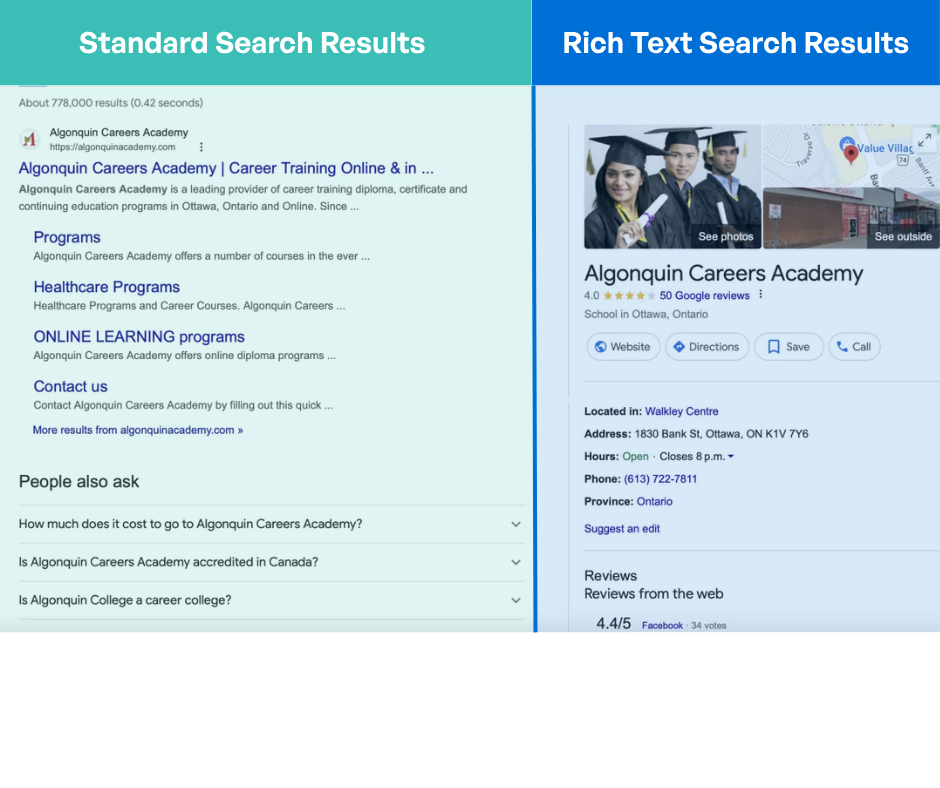
Event schema is incredibly powerful for enrollment because it surfaces your events directly in search results. When a family searches “open houses near me” or “charter school events in [city],” your event can appear with all the details they need—date, time, location, and a registration link—without them ever visiting your website.
How AI Engines Use Schema Markup to Answer Questions
Here’s a concrete example of how schema markup impacts search:
Without schema markup: A family searches “What grades does [school name] serve?” Google has to crawl your website, read through all your content, and try to figure out the answer. It might get it wrong or take longer to index.
With School schema: Google sees the schema markup, finds the “grades served” parameter, and instantly knows the answer. It can display this information in a knowledge panel, in AI overviews, or in rich search results.
The same applies to Event schema. When families search for “open houses in [city],” AI search tools can pull event schema directly and show them which schools have events, when they’re happening, and how to register—all without clicking through to websites.
As Niki noted: “AI has changed how we search for things. In the past, we would do short keywords, but now we’re seeing a lot of more long-form questions. You want to make sure that’s accurate.”
How Difficult Is It to Implement Schema Markup?
This is the biggest misconception: that schema markup is complicated and requires a developer.
It’s not. Marketing teams absolutely can handle this.
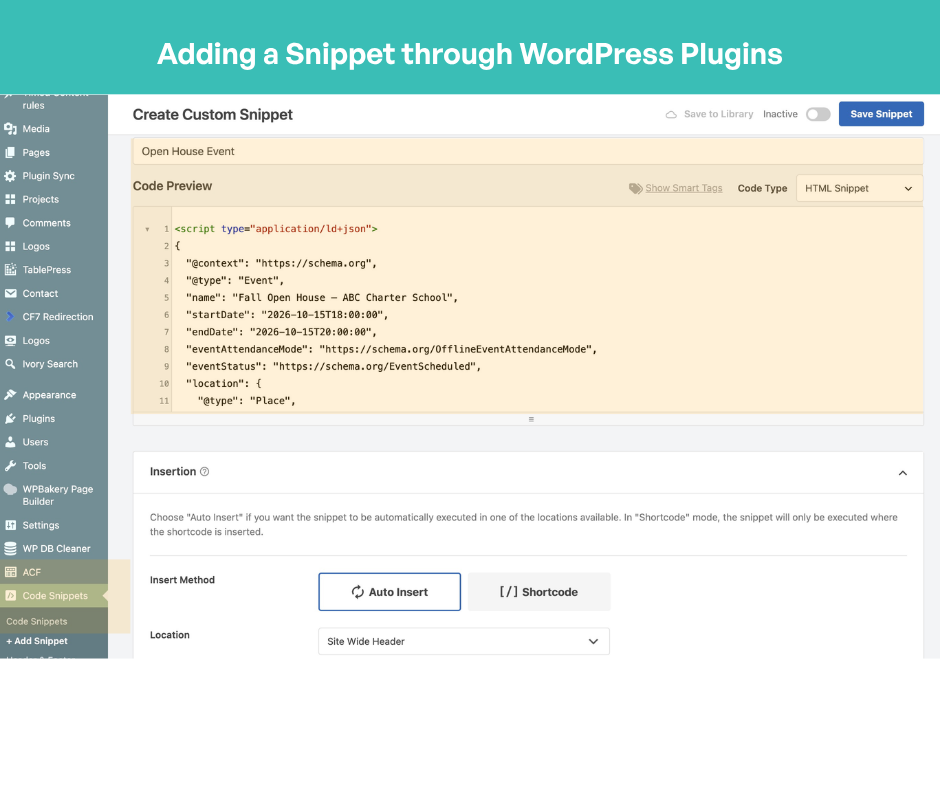
Option 1: WordPress Plugins (Easiest)
If your school website runs on WordPress, this is simple:
Free plugins like Yoast SEO and Rank Math automatically generate basic schema based on your site settings — no coding required
Rank Math also lets you paste in custom JSON-LD directly through its built-in Schema Generator
For a simpler paste-and-go approach, free plugins like WP Code, BBH Custom Schema, or Code Snippets let you drop custom code directly into your site header
Yoast SEO and Rank Math are free for basic schema — advanced automation features require a paid version
Option 2: Online Schema Generators
If you don’t use WordPress, use a free online schema generator:
Select “School” from the schema type dropdown
Answer questions about your school (name, address, grades, focus areas, contact info)
The generator outputs the code you need
Copy and paste that code into your website (your developer or website platform can help with this)
Option 3: Use ChatGPT or Claude
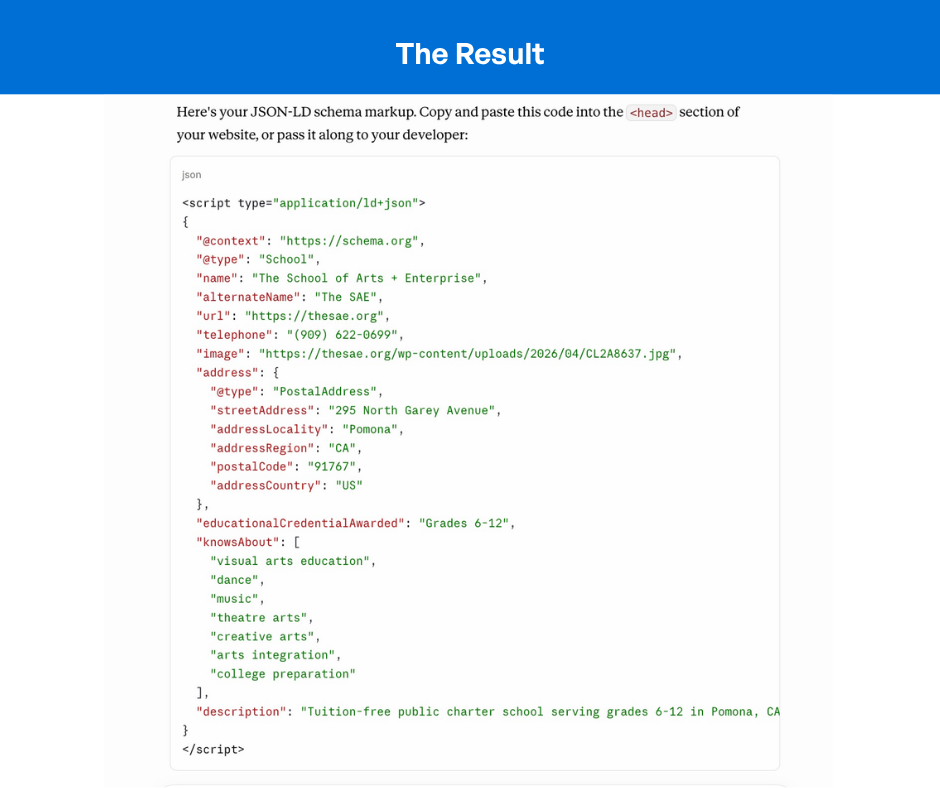
You can ask AI to generate schema markup for you:
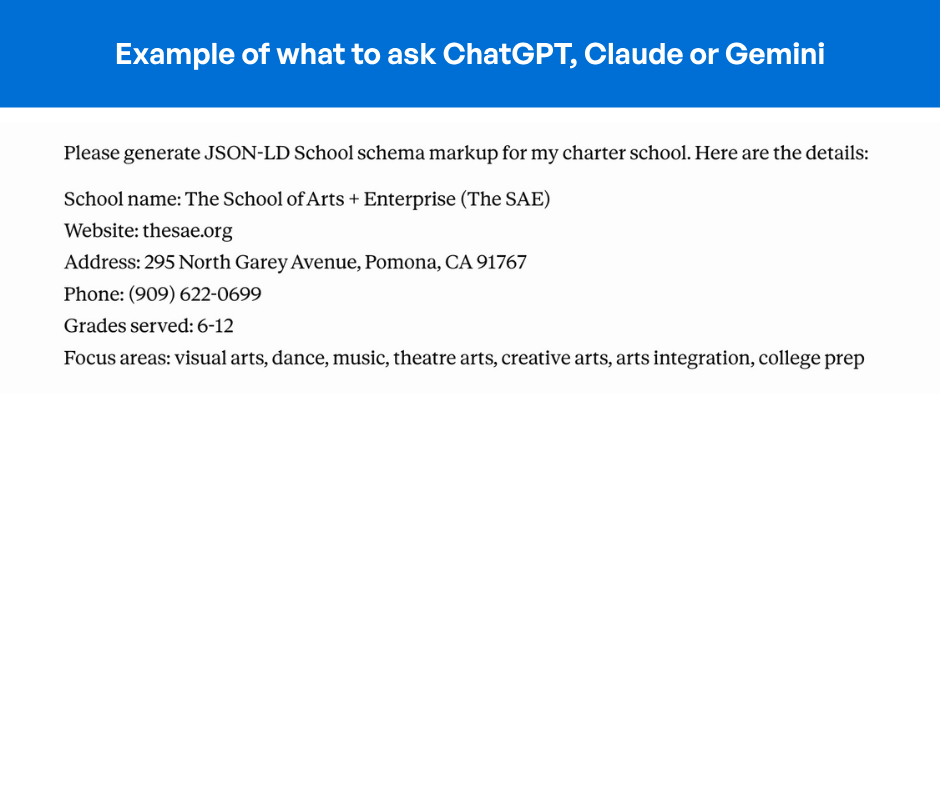
Prompt: “Please generate JSON-LD schema for my K-12 charter school. Here are the details: [your school info]”
AI generates the code instantly
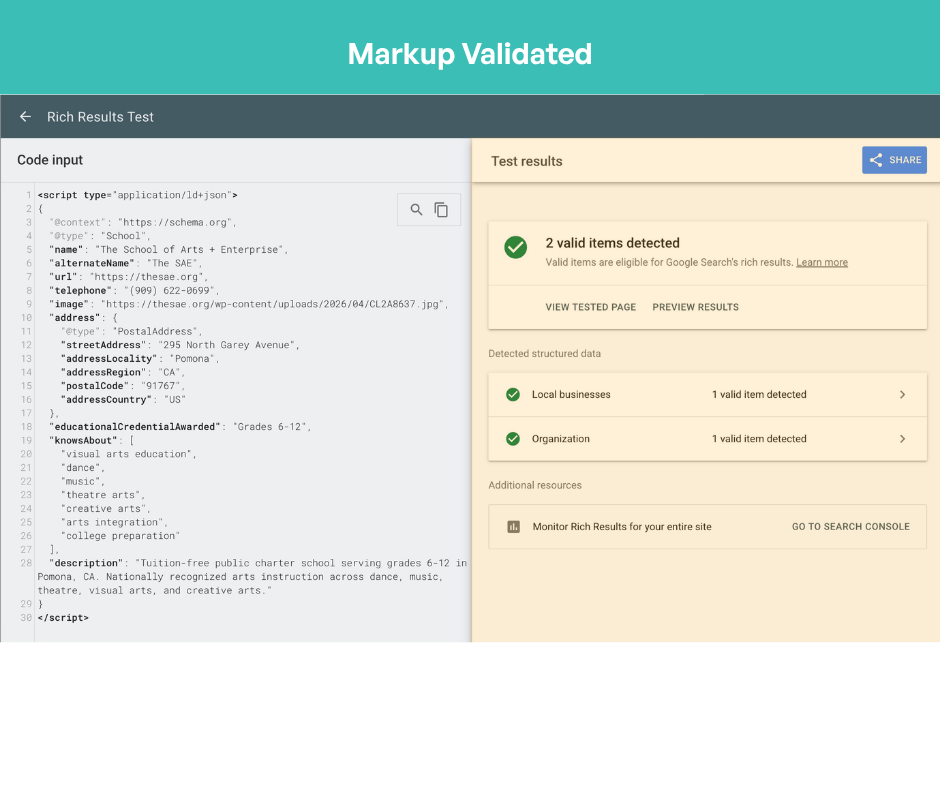
Test it with Google Rich Results Test to make sure it’s correct
Copy and paste the code into your website
Option 4: Developer Implementation
If your website is custom-built or you need help:
A developer can add schema markup directly to your site code
This is a small project—typically just a few hours of work
Not an expensive or time-consuming undertaking
Which Schema Should You Prioritize?
If you only have bandwidth to implement one or two schema markups, here’s what matters:
Priority #1: School Schema
Start here. School schema covers your basic identity—name, address, grades served, focus areas, contact information. This is the foundation that ensures families can find accurate information about your school.
Without School schema, you’re essentially invisible to AI search engines trying to answer questions about what your school is.
Priority #2: Event Schema (for enrollment)
Once you have School schema working, add Event schema for specific enrollment events:
Fall open houses
Spring information nights
Enrollment webinars
Campus tours
Information sessions
Event schema has immediate ROI because families actively search for school events during enrollment season. When you can surface your open house directly in search results with the date, time, location, and registration link, you’re meeting families exactly where they’re searching.
How Event Schema Works in Search Results
Here’s what happens when you implement Event schema correctly:
The family searches: “Open houses near me” or “charter school events in [city]”
Your event appears in search results with:
Event name (Fall Open House)
Date and time
Location
Registration link
Whether it’s in-person or virtual
The family can register without visiting your website because the registration link is right there in the search result.
This is powerful because families are actively searching during enrollment season. You’re not pushing information at them—you’re showing up exactly where they’re looking.
Important: Use Event Schema Only for Specific Events
One critical point: Event schema only works for events with specific dates. Don’t use it for ongoing concepts like “enrollment open all season.” Use it for:
“Fall Open House—October 15, 2026”
“Spring Information Night—March 22, 2026”
“Summer Campus Tour—June 3, 2026”
If you create Event schema for something without a specific date, Google will ignore it. And Niki noted: “You don’t want it to ignore one thing because then it might ignore other things. So you just want to be intentional about creating that event.”
Step-by-Step: Implementing Schema Markup
Here’s the process from start to finish:
Step 1: Choose Your Schema Type
Start with School schema. Later, add Event schema for specific events.
Step 2: Gather Your Information
Collect the details you’ll need:
School name, website, logo URL
Address (complete, including zip code)
Grades served
Focus areas/specializations
Contact information
For events: name, date, time, location, registration URL
Step 3: Generate the Code
Use WordPress plugins, online generators, or ask ChatGPT to generate JSON-LD code
Step 4: Test the Code
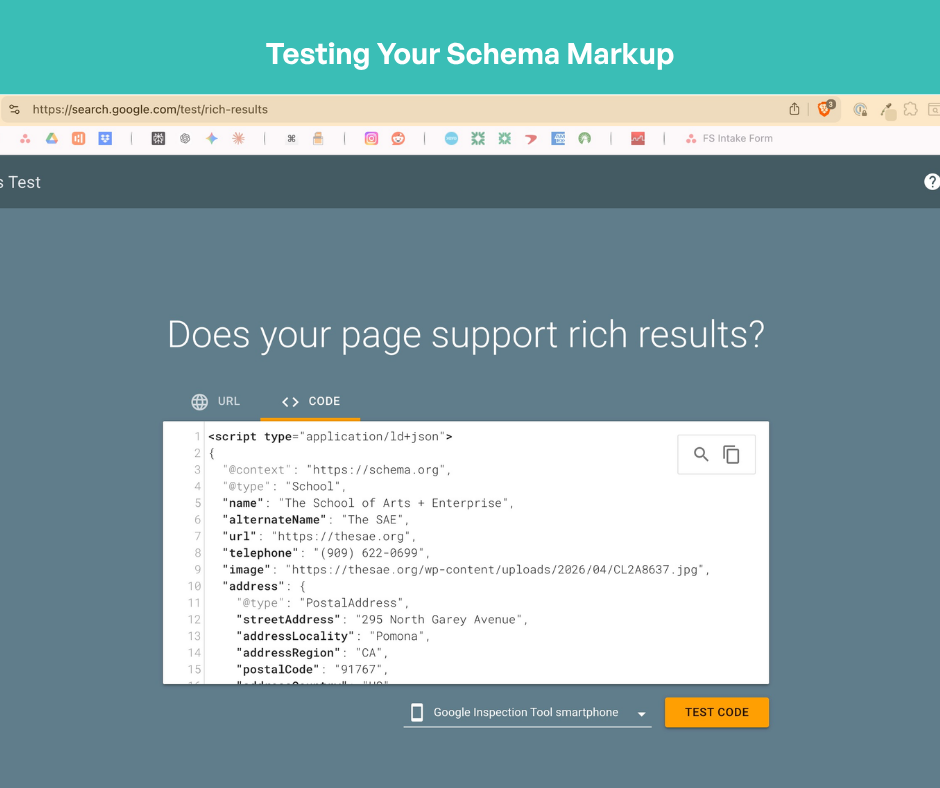
Go to Google Rich Results Test (free tool from Google)
Paste your code
Check for errors or warnings
Fix any issues
Step 5: Add to Your Website
If using WordPress: activate the plugin, fill out the fields
If custom website: have your developer add the code to your site header
If using a website builder: follow their instructions for adding custom code
Step 6: Monitor and Update
Check Google Search Console to see how your rich results appear
Update Event schema as new events are scheduled
Keep School schema current (address changes, new focus areas, etc.)
Real-World Impact: Why This Matters for Enrollment
Here’s why Niki emphasizes schema markup for schools:
Without schema markup: A family searching “best STEM charter schools near me” might not find your school at all, even if it’s a perfect fit. The AI search engine doesn’t have enough structured information to surface it.
With School schema: Your school appears in results because the AI knows your school specializes in STEM. It knows your location. It has your address and contact information.
With Event schema: The same family searching “open house near me” during enrollment season sees your event with the date, time, and registration link. No extra clicks needed.
This is the difference between families finding your school and your school being invisible.
Getting Started: The Easiest Path Forward
Don’t overthink this. Here’s what to do:
This week: Pick a free schema generator or open ChatGPT
Generate School schema using your school’s basic information
Test it with Google Rich Results Test
Add it to your website (or have your developer do it)
Wait a few weeks for Google to crawl and update
Check Google Search Console to see how your rich results appear
Next month: Create Event schema for your next enrollment event
The entire process takes a few hours. The impact lasts indefinitely.
As Niki emphasized: “There is a little bit of a learning curve, but it’s all things you can figure out online for free.”
Why Now?
AI has changed search. Families are asking more conversational questions. Search engines are pulling answers from structured data.
If you don’t have schema markup, you’re relying on luck that search engines guess correctly about what your school is. With schema markup, you’re telling them directly.
In the world of AI-driven search, that’s the difference between being found and being invisible.
Niki Blaker is an SEO and digital strategy consultant who helps schools improve online visibility and discoverability. She specializes in website optimization, digital strategy, and helping schools show up in search.
Frequently Asked Questions
What exactly is schema markup?
Schema markup is code you add to your website that tells search engines (Google, Bing) and AI systems what your content means. Instead of forcing search engines to read and interpret your entire webpage, schema markup breaks your information into labeled chunks—name, address, grades served, focus areas—so search engines can understand it instantly and accurately.
Why do charter schools need schema markup now?
AI search has changed how people find schools. Families now search using full sentences like “What is the best charter school that focuses on STEM near me?” instead of short keywords. AI search engines answer these questions by pulling structured data from websites. Without schema markup, your school might not appear in AI-generated answers, or appear with inaccurate information.
What are the three types of schema markup schools should focus on?
School schema defines your school’s basic identity—name, address, grades served, focus areas, and contact information. Organization schema provides broader organizational information like year established and leadership (mainly useful for charter networks). Event schema surfaces specific events like open houses with date, time, location, and registration information directly in search results. Start with School schema, then add Event schema for your biggest impact.
Do I need a developer to implement schema markup?
No. If you use WordPress, there are a few ways to add schema without touching your site’s core files. Yoast SEO automatically generates basic schema based on your site settings, but doesn’t support custom JSON-LD input. Rank Math does the same and also lets you paste in custom JSON-LD directly through its built-in Schema Generator.
For a simpler paste-and-go approach, free plugins like WP Code, BBH Custom Schema, or Code Snippets let you drop the code directly into your site header. You can generate the code itself for free using an online schema generator or by asking ChatGPT. And if you do have a custom website and need a developer, it’s a small project — typically just a few hours of work.
How long does it take to see results from schema markup?
Once you add schema markup and Google crawls your site (usually within days to weeks), the information can appear in rich search results, knowledge panels, and AI overviews. The timeline varies, but you can monitor progress through Google Search Console. Even if search results don’t change immediately, the structured data is working behind the scenes.
Can I use Event schema for “enrollment open all season”?
No. Event schema only works for events with specific dates—”Fall Open House—October 15″ not “Open Enrollment All Season.” Google ignores Event schema without specific dates. You want intentional, accurate Event schema so Google doesn’t discount other schema you’ve created.
What’s the difference between School schema and Organization schema?
School schema is specific to schools and includes parameters like grades served, focus areas, and educational details. Organization schema is broader business information like year established, leadership, and organizational structure. For single schools, School schema is sufficient. For charter networks with multiple campuses, Organization schema helps Google understand the network relationship.
What information do I need to gather to create schema markup?
For School schema: school name, website URL, logo URL, complete physical address (including zip code), grades served, focus areas/specializations, and contact person. For Event schema: event name, specific date and time, location, registration URL, and whether it’s in-person or virtual. The more detailed your information, the better the schema works.
How do I test if my schema markup is correct?
Use Google’s free Rich Results Test tool. Paste your schema code into the tool, and it will check for errors, warnings, and validate whether the schema is correct. It will also show you how your information might appear in search results. If there are errors, you can use ChatGPT to debug and fix them.
What’s the best time to implement Event schema for enrollment events?
Implement Event schema about 2-4 weeks before your event. This gives Google time to crawl and index the schema before families are actively searching for events. For open houses in fall, implement Event schema in late August or early September. For spring information nights, implement in late January or early February. The closer you are to enrollment season, the more valuable Event schema becomes.
What impact will schema markup have on my enrollment?
Schema markup won’t directly enroll families, but it helps families find your school. Families searching “STEM charter schools near me” will see your school in results if you have School schema. Families searching “open houses near me” will see your event with registration details if you have Event schema. The result: more qualified families discovering your school exactly when they’re searching for it.
Niki Blaker is an SEO and digital strategy consultant specializing in helping schools improve their online visibility and discoverability. She works with educational institutions on website optimization, schema markup implementation, and digital strategy to ensure families can find them when searching online.
For 25 years, the kids at Palm Beach Maritime Academy have been tagging sharks, building boats, and doing coastal conservation work in the waters of South Florida. Now, the school that’s been doing it longer than any other general education charter school in Palm Beach County has a permanent home to keep doing it.
PBMA has found a permanent home for its two Lantana, Florida, campuses with support from Grow Schools, a provider of facilities, financing, and enrollment services to charter schools nationwide. School Infrastructure Fund II Holdings LLC, a school facilities owner managed by American Infrastructure Partners, LLC, acquired both campuses for $21.3 million — ensuring PBMA’s nearly 1,000 K–12 students have stable, mission-aligned facilities and positioning the school for continued growth across Palm Beach County.
Grow Schools is also partnering with the academy on enrollment marketing through its Kids to Fill Your School program — helping connect more Palm Beach County families with what PBMA has to offer.
Founded in 1999, PBMA offers a distinctive STEAM curriculum with a hands-on emphasis on marine sciences, including shark tagging, boat building, and coastal conservation. The school’s elementary campus at 1518 Lantana Road serves K–5 students, while the secondary campus at 600 S East Coast Avenue serves grades 6–12.
Together, the two campuses serve a high-need community in the Boynton/Lantana area, with over 61% of students qualifying for free or reduced lunch and more than 79% of students from minority backgrounds. PBMA has been recognized as a Best of Palm Beach County school for multiple consecutive years.
The investment reflects the school’s strong and improving trajectory. The elementary school advanced from a C to a B rating in the 2024–25 school year, with both campuses on track for continued academic gains. Enrollment for the upcoming school year is tracking 11% above the same point last year — a signal that families across Palm Beach County are taking notice.
“For 25 years, Palm Beach Maritime Academy has been a home for kids in this community, — a place where they can explore, grow, and discover what they’re capable of,” said Steve Casenza, CEO & CFO, Palm Beach Maritime Academy. “Securing our facilities means we can keep building on everything we’ve worked so hard to create. We’re grateful to Grow Schools for believing in our mission and helping us take this next step.”
— Steve Casenza, CEO & CFO, Palm Beach Maritime Academy
A School That’s Delivering on Its Mission
PBMA isn’t a typical K–12 school. It’s a STEAM school built around marine sciences. The school’s elementary campus at 1518 Lantana Road serves K–5 students. The secondary campus at 600 S East Coast Avenue takes grades 6–12. Together, they serve nearly 1,000 kids in the Boynton/Lantana area, a community where over 61% of students qualify for free or reduced lunch and more than 79% come from minority backgrounds.
PBMA has been recognized as a Best of Palm Beach County school for multiple consecutive years. The elementary school moved from a C to a B rating in 2024–25. Enrollment for the upcoming school year is tracking 11% ahead of where it was at this point last year. Families are finding it — and they’re staying.
“Palm Beach Maritime Academy has been delivering on its mission for years — securing kids in this community and giving them access to a one-of-a-kind learning experience. We’re proud to support them in getting the message out, advancing their facility, and making sure even more families in Palm Beach County know what this school has to offer.”
— Kirt Nilsson, Head of Originations, Grow Schools
An aerial view shows one of Palm Beach Maritime Academy’s two Lantana campuses, which were recently acquired through a transaction supported by Grow Schools. The acquisition provides long-term facility stability for the charter school and its nearly 1,000 students. (photo courtesy of Palm Beach Maritime Academy)
Most schools treat a tour like a showing, highlighting the classrooms, cafeteria, and the school gymnasium, but when it comes down to it, families aren’t evaluating square footage. They’re asking one question the entire time: Can I picture my child here?
Parents that tour your school are watching how a teacher responds when a student gets something wrong, noticing whether the principal knows the students by name in the hallway. They’re feeling the energy in a classroom before they’re thinking about the curriculum. The tour is an emotional audition, not an information session and the schools that understand that fill their seats faster than the ones that don’t.
Here’s how to make sure your school is ready.
The Tour Starts Before They Walk Through the Door
Most enrollment teams think the tour begins at the front entrance, but families start forming impressions long before that.
It starts when a parent searches your school on Google and finds outdated hours, a missing phone number, or photos from three years ago. It starts when they can’t figure out where to park. It starts when they walk in and no one at the front desk looks up.
The impression your school makes before anyone arrives is just as important as what happens inside.
Your Google Business Profile Is Your First Impression
Your Google Business Profile is often the very first thing a prospective family sees, before your website, before your social media, before anything else. And most schools are leaving it half-finished.
Make sure yours has:
Accurate hours, school address, and a phone number
Recent photos that show your school as it actually looks today
A short, compelling description of what makes your school different
Responses to reviews – don’t stress if a few are critical
A family who finds a complete, active, professional profile arrives at your tour with confidence already building. A family who finds a photo from 2019 and an unanswered one-star review arrives with doubt already in the room.
How to Prepare Your School for a Tour That Converts
Once you’ve gotten the details right outside your doors, here’s how to make sure the experience inside delivers.
Brief everyone at the school, not just admissions
Every school representative a family encounters during a tour is part of the experience. Teachers, front office staff, the person they pass in the hallway. A warm, natural greeting from someone who wasn’t expecting to matter goes a long way. Let your whole team know tours are happening and what you want families to feel when they leave.
Don’t hide the school
The temptation is to route families through your best spaces and avoid the messier ones. Resist it. A real classroom in the middle of a real lesson, even an imperfect one, builds more trust than a polished showcase of empty rooms. Authenticity is the point.
Let your students share with prospective families
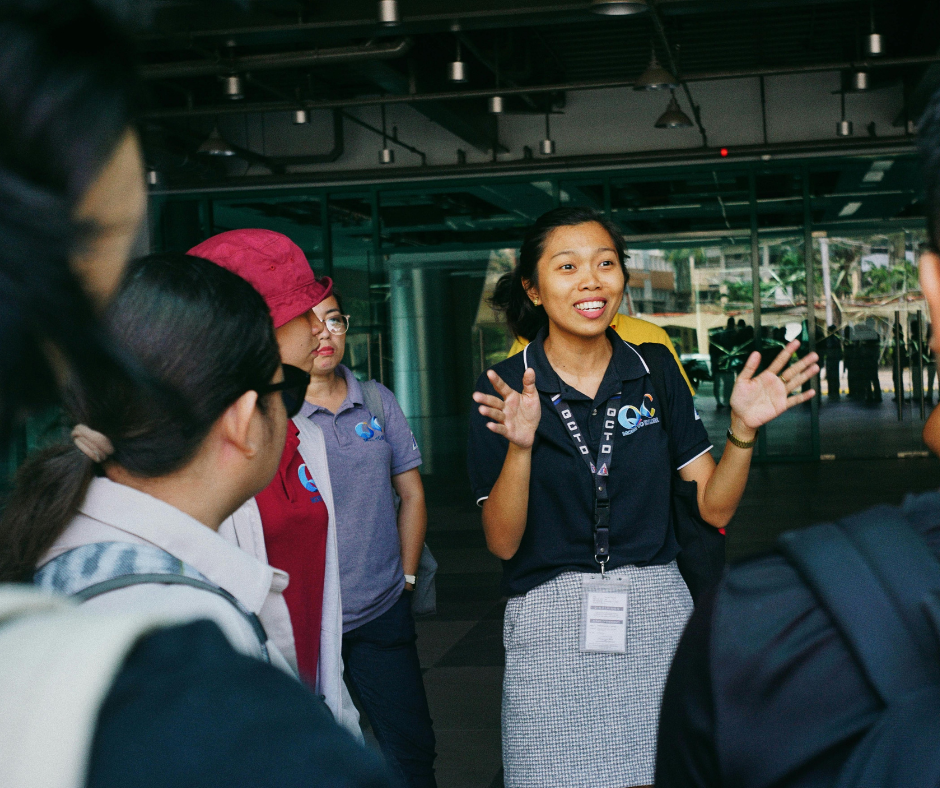
Some of the most powerful tour moments happen when a student speaks unprompted. Prepare a small group of student ambassadors, not with a script, but with a simple conversation about what they love about the school. Families want to hear from the students, and believe the honesty of kids in a way they don’t always believe administrators.
Make the next step obvious before they leave
A family who walks out impressed but unsure what to do next is a warm lead going cold. Before they reach the parking lot, they should know exactly how to apply, when the next open house is, and who to call with questions. Hand them something. Send a follow-up that day. Don’t make them work for it.
Families won’t remember every statistic you share about your school, but they will remember how the school, teachers, students and administration made them feel. They’re noticing whether the environment feels calm or chaotic, warm or institutional. Does my child belong here? Would they be seen here? Would they be safe here?
Following Up After the Tour
The tour might end when the family leaves, but your enrollment work is just beginning!
Send a personal follow-up within 24 hours. Make the follow-up personal, and reference something specific from their visit.
For families who toured but haven’t yet applied, a simple check-in within two weeks is a must. A genuine phone call from the enrollment team or even the administrative staff asking to answer any questions they might still have goes a long way.
One of the most important pieces is to log everything! Which families toured, when they came in, whether they followed up, and what their questions were. This data tells you where families are getting stuck in the process, and where in the enrollment process might need adjusting.
The families who tour your school are making one of the most important decisions they’ll make for their child. They’re not just choosing a curriculum, they’re choosing a school community. When you get the details right, from the Google search that brings them to your door to the follow-up note that lands in their inbox that evening, you’re not just running a better tour. You’re showing them exactly the kind of school you are.