
When a family searches “best STEM charter schools near me,” where does your school appear in the results?
More importantly: does it appear at all?
For many schools, the answer is no—not because the school isn’t great, but because search engines and AI systems don’t have enough structured information to understand what the school is, where it’s located, what it specializes in, or when events are happening.
That’s where schema markup comes in.
Schema markup sounds technical (because it is code), but the concept is simple: it’s a standardized way to tell Google, Bing, and AI search engines exactly what your school is and what information matters most. Instead of forcing search engines to crawl your entire website and make educated guesses, you’re providing them with precise, structured data.
In the AI-driven search world, this has become critical for discoverability.
What Is Schema Markup?
Schema markup is a small piece of code you add to your website that helps search engines understand the meaning of your content. Think of it as labels for different pieces of information on your site.
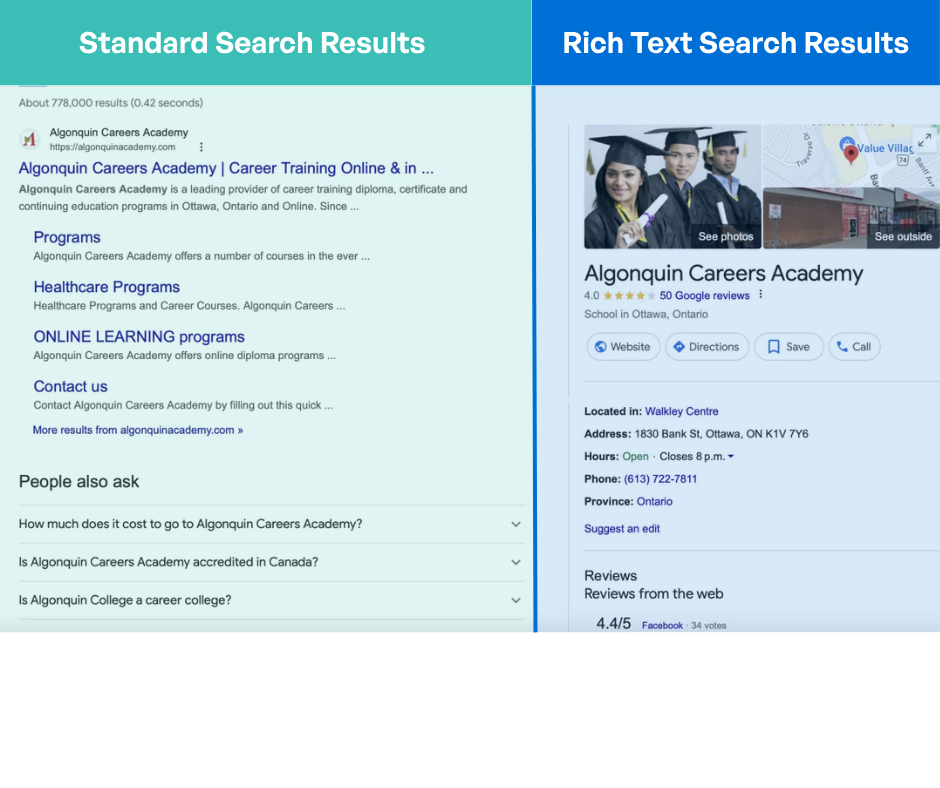
Without schema markup, Google sees a webpage with text, images, and links. It has to parse all of that unstructured information and try to figure out what your school is, where you’re located, what grades you serve, and what makes you unique. It’s slow and often inaccurate.
With schema markup, you’re saying: “This is the name of my school. This is our address. These are the grades we serve. This is what we’re known for.”
Instead of Google guessing, you’re telling it directly.
Why Schema Markup Matters Now (More Than Ever)
Schema markup has always been important for SEO, but AI has changed the game.
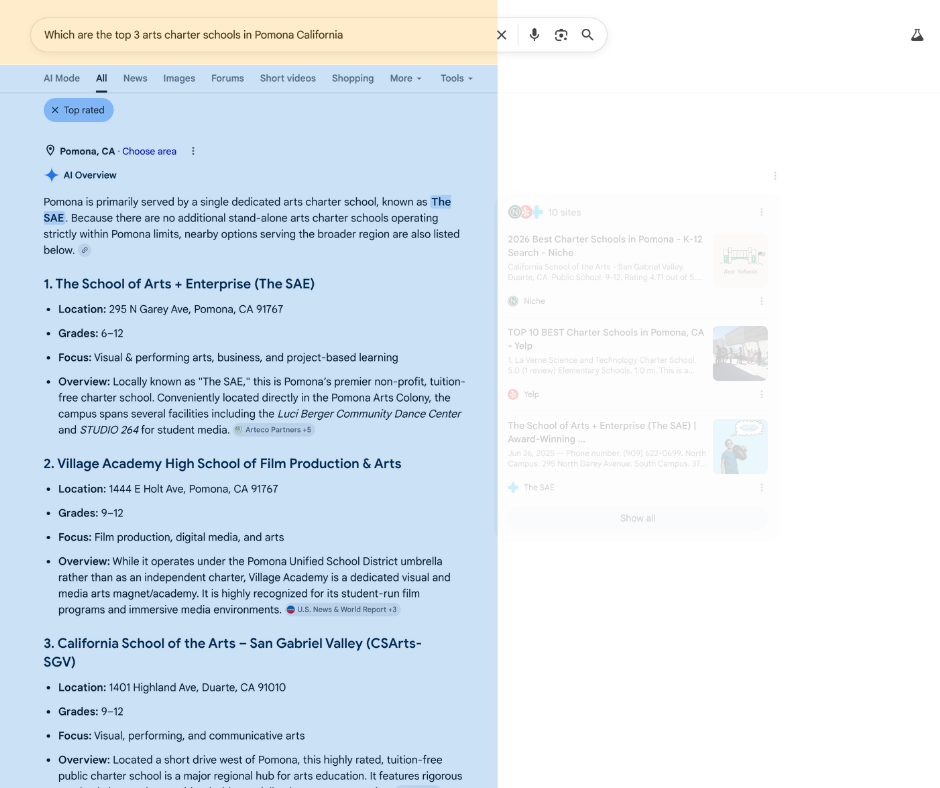
In the past, people searched using short keywords: “charter schools near me” or “STEM schools.” Search engines had to match keywords to websites.
Now, people search using full sentences: “What is the best charter school that focuses on STEM near me?” or “When is the open house for [school name]?”
AI search tools like Google’s AI Overviews and other AI-powered search engines answer these questions by pulling structured data from websites. If your school has schema markup, the AI can find the exact information it needs and include your school in the answer. Without it, your school is invisible to AI search.
As Niki explained: “The way that AI tools are pulling answers is by going through chunks of information. You want to make sure that’s accurate.”
If you don’t tell search engines what your school is, they might get it wrong—or miss you entirely.
The Three Types of Schema Markup Schools Need
There are hundreds of different schema types, but schools should focus on three:
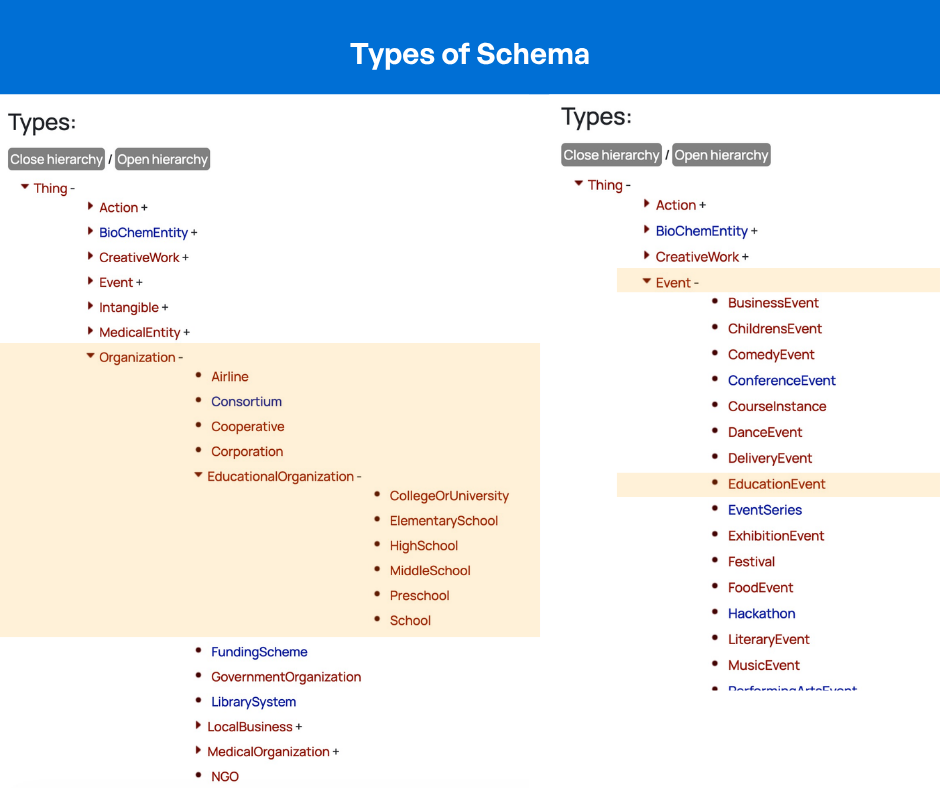
1. School Schema
School schema is your foundation. It tells search engines: “This is a school, and here’s what you need to know about it.”
School schema includes parameters like:
- School name: The official name of your school
- Website URL: Where to find more information
- Logo URL: How to identify your school visually
- Contact person: Who families should reach out to
- Address: Your physical location
- Grades served: Kindergarten through 12th grade, or specific grades
- Knows about: What your school specializes in (STEM, arts integration, dual language, project-based learning, etc.)
The “knows about” field is particularly powerful because it’s where you define your school’s focus. This is how you connect to searches like “STEM charter schools” or “arts-focused schools in my area.”
School schema is the minimum any school should implement. It ensures that basic information about your school appears accurately in search results and knowledge panels.
2. Organization Schema
Organization schema is the parent structure of School schema. It provides broader organizational information like:
- Year established
- Leadership (CEO, principal, etc.)
- Organizational structure
- Multiple school locations (for networks)
- Additional business information
For single-school charters, School schema is usually sufficient. For charter networks with multiple campuses, Organization schema helps Google understand the relationship between the network and individual schools.
3. Event Schema
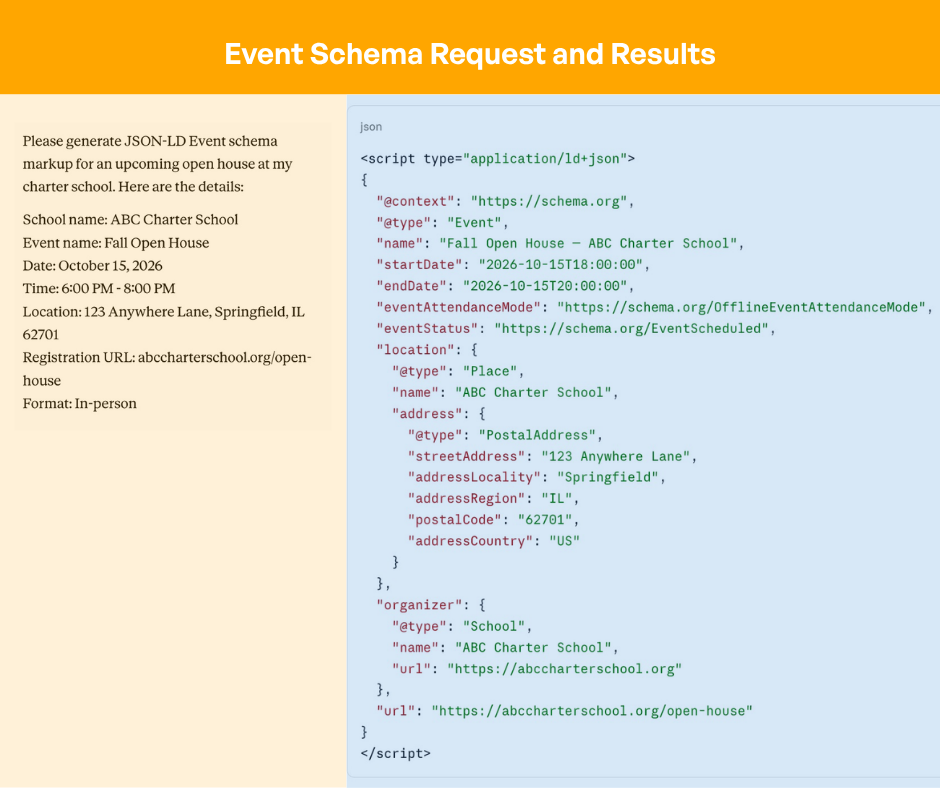
Event schema tells search engines about specific events happening at your school with precise details:
- Event name: “Fall Open House” or “Enrollment Information Night”
- Date and time: When the event happens
- Location: Physical address or virtual meeting link
- Registration/ticketing: How to sign up or register
- Virtual or in-person indicator: Which format applies
Event schema is incredibly powerful for enrollment because it surfaces your events directly in search results. When a family searches “open houses near me” or “charter school events in [city],” your event can appear with all the details they need—date, time, location, and a registration link—without them ever visiting your website.
How AI Engines Use Schema Markup to Answer Questions
Here’s a concrete example of how schema markup impacts search:
Without schema markup: A family searches “What grades does [school name] serve?” Google has to crawl your website, read through all your content, and try to figure out the answer. It might get it wrong or take longer to index.
With School schema: Google sees the schema markup, finds the “grades served” parameter, and instantly knows the answer. It can display this information in a knowledge panel, in AI overviews, or in rich search results.
The same applies to Event schema. When families search for “open houses in [city],” AI search tools can pull event schema directly and show them which schools have events, when they’re happening, and how to register—all without clicking through to websites.
As Niki noted: “AI has changed how we search for things. In the past, we would do short keywords, but now we’re seeing a lot of more long-form questions. You want to make sure that’s accurate.”
How Difficult Is It to Implement Schema Markup?
This is the biggest misconception: that schema markup is complicated and requires a developer.
It’s not. Marketing teams absolutely can handle this.
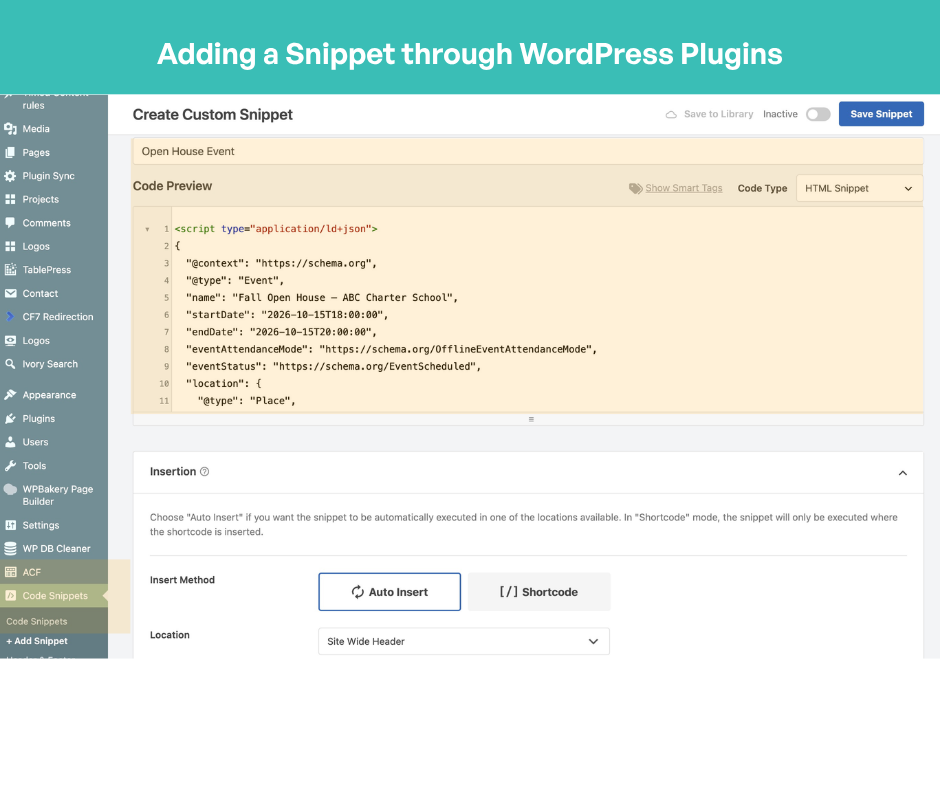
Option 1: WordPress Plugins (Easiest)
If your school website runs on WordPress, this is simple:
- Free plugins like Yoast SEO and Rank Math automatically generate basic schema based on your site settings — no coding required
- Rank Math also lets you paste in custom JSON-LD directly through its built-in Schema Generator
- For a simpler paste-and-go approach, free plugins like WP Code, BBH Custom Schema, or Code Snippets let you drop custom code directly into your site header
- Yoast SEO and Rank Math are free for basic schema — advanced automation features require a paid version
Option 2: Online Schema Generators
If you don’t use WordPress, use a free online schema generator:
- Select “School” from the schema type dropdown
- Answer questions about your school (name, address, grades, focus areas, contact info)
- The generator outputs the code you need
- Copy and paste that code into your website (your developer or website platform can help with this)
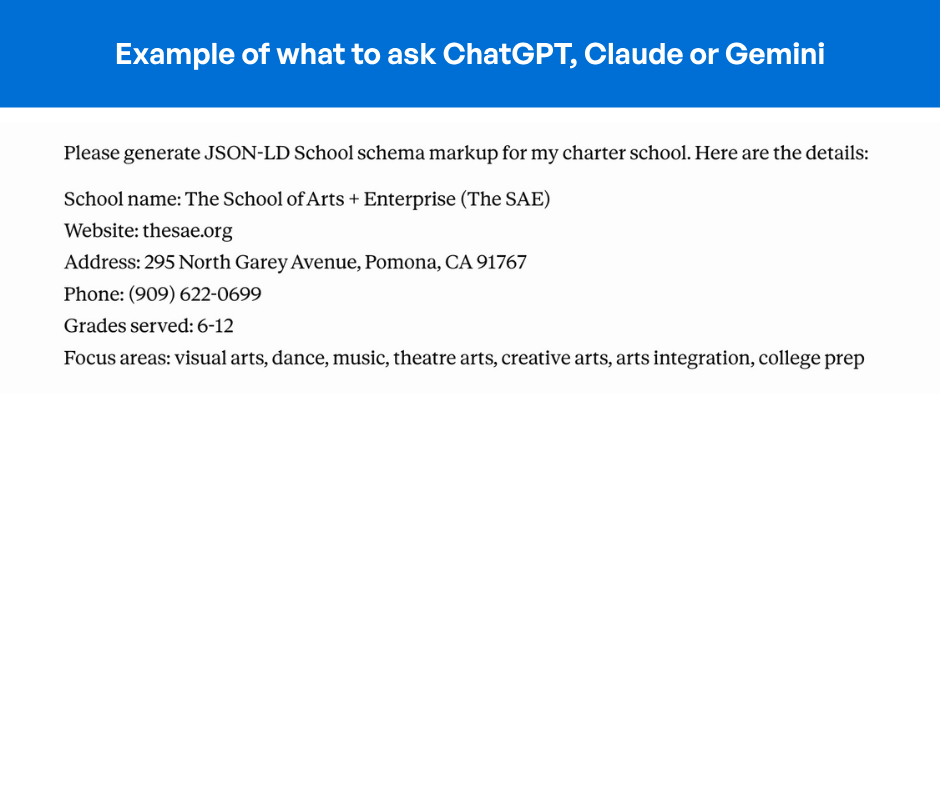
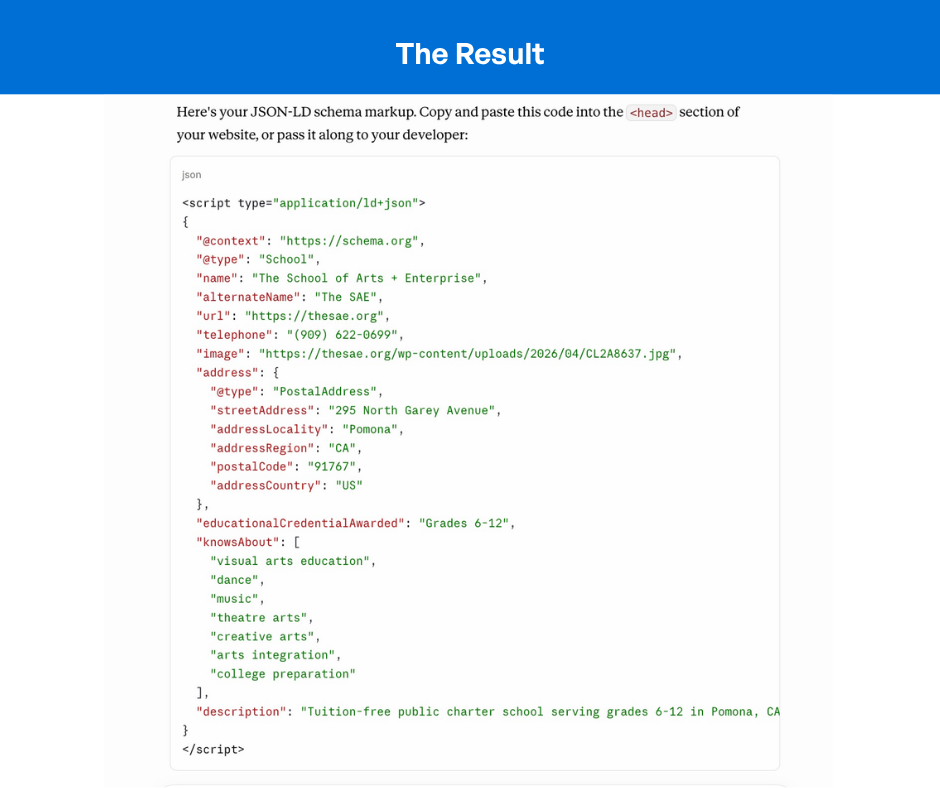
Option 3: Use ChatGPT or Claude
You can ask AI to generate schema markup for you:
- Prompt: “Please generate JSON-LD schema for my K-12 charter school. Here are the details: [your school info]”
- AI generates the code instantly
- Test it with Google Rich Results Test to make sure it’s correct
- Copy and paste the code into your website
Option 4: Developer Implementation
If your website is custom-built or you need help:
- A developer can add schema markup directly to your site code
- This is a small project—typically just a few hours of work
- Not an expensive or time-consuming undertaking
Which Schema Should You Prioritize?
If you only have bandwidth to implement one or two schema markups, here’s what matters:
Priority #1: School Schema
Start here. School schema covers your basic identity—name, address, grades served, focus areas, contact information. This is the foundation that ensures families can find accurate information about your school.
Without School schema, you’re essentially invisible to AI search engines trying to answer questions about what your school is.
Priority #2: Event Schema (for enrollment)
Once you have School schema working, add Event schema for specific enrollment events:
- Fall open houses
- Spring information nights
- Enrollment webinars
- Campus tours
- Information sessions
Event schema has immediate ROI because families actively search for school events during enrollment season. When you can surface your open house directly in search results with the date, time, location, and registration link, you’re meeting families exactly where they’re searching.
How Event Schema Works in Search Results
Here’s what happens when you implement Event schema correctly:
The family searches: “Open houses near me” or “charter school events in [city]”
Your event appears in search results with:
- Event name (Fall Open House)
- Date and time
- Location
- Registration link
- Whether it’s in-person or virtual
The family can register without visiting your website because the registration link is right there in the search result.
This is powerful because families are actively searching during enrollment season. You’re not pushing information at them—you’re showing up exactly where they’re looking.
Important: Use Event Schema Only for Specific Events
One critical point: Event schema only works for events with specific dates. Don’t use it for ongoing concepts like “enrollment open all season.” Use it for:
- “Fall Open House—October 15, 2026”
- “Spring Information Night—March 22, 2026”
- “Summer Campus Tour—June 3, 2026”
If you create Event schema for something without a specific date, Google will ignore it. And Niki noted: “You don’t want it to ignore one thing because then it might ignore other things. So you just want to be intentional about creating that event.”
Step-by-Step: Implementing Schema Markup
Here’s the process from start to finish:
Step 1: Choose Your Schema Type
Start with School schema. Later, add Event schema for specific events.
Step 2: Gather Your Information
Collect the details you’ll need:
- School name, website, logo URL
- Address (complete, including zip code)
- Grades served
- Focus areas/specializations
- Contact information
- For events: name, date, time, location, registration URL
Step 3: Generate the Code
- Use WordPress plugins, online generators, or ask ChatGPT to generate JSON-LD code
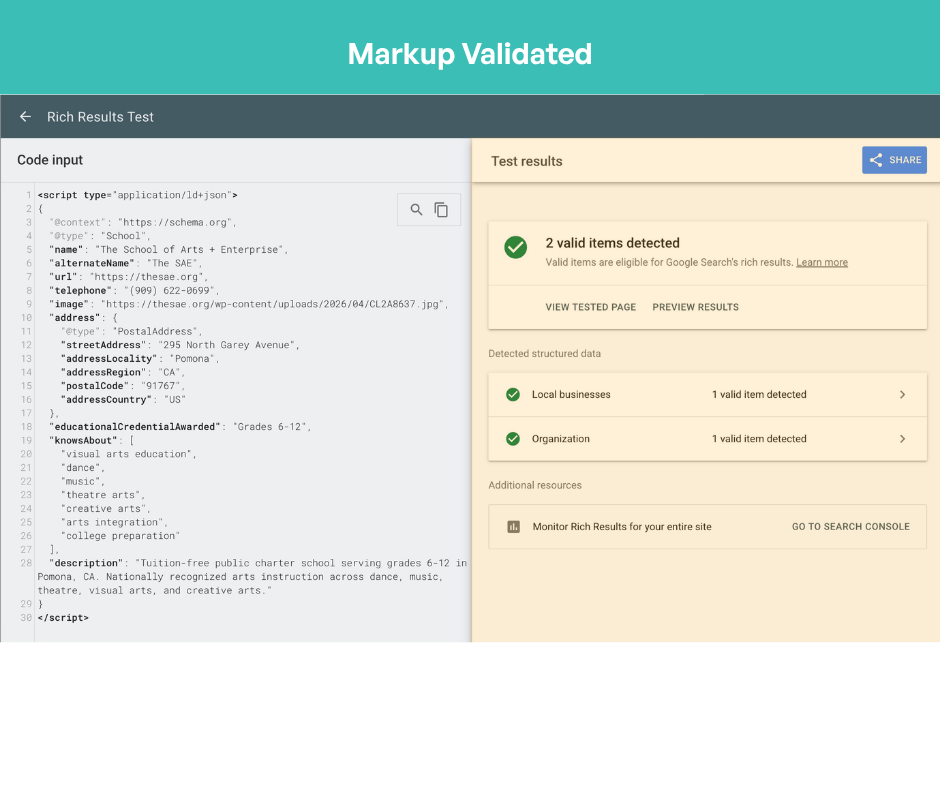
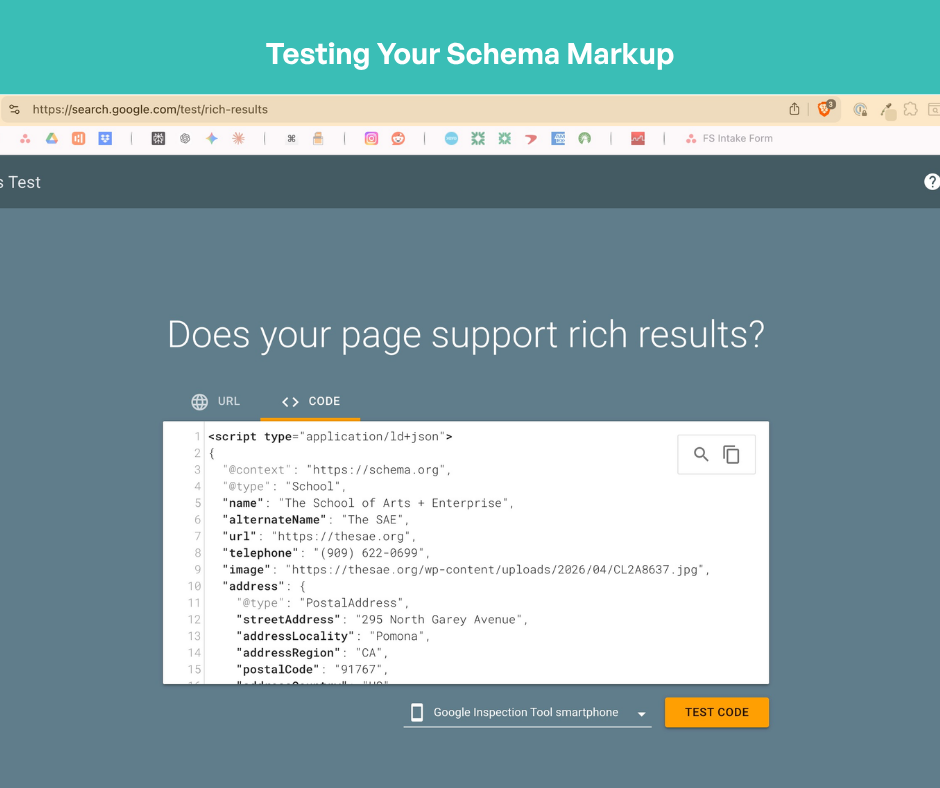
Step 4: Test the Code
- Go to Google Rich Results Test (free tool from Google)
- Paste your code
- Check for errors or warnings
- Fix any issues
Step 5: Add to Your Website
- If using WordPress: activate the plugin, fill out the fields
- If custom website: have your developer add the code to your site header
- If using a website builder: follow their instructions for adding custom code
Step 6: Monitor and Update
- Check Google Search Console to see how your rich results appear
- Update Event schema as new events are scheduled
- Keep School schema current (address changes, new focus areas, etc.)
Real-World Impact: Why This Matters for Enrollment
Here’s why Niki emphasizes schema markup for schools:
Without schema markup: A family searching “best STEM charter schools near me” might not find your school at all, even if it’s a perfect fit. The AI search engine doesn’t have enough structured information to surface it.
With School schema: Your school appears in results because the AI knows your school specializes in STEM. It knows your location. It has your address and contact information.
With Event schema: The same family searching “open house near me” during enrollment season sees your event with the date, time, and registration link. No extra clicks needed.
This is the difference between families finding your school and your school being invisible.
Getting Started: The Easiest Path Forward
Don’t overthink this. Here’s what to do:
- This week: Pick a free schema generator or open ChatGPT
- Generate School schema using your school’s basic information
- Test it with Google Rich Results Test
- Add it to your website (or have your developer do it)
- Wait a few weeks for Google to crawl and update
- Check Google Search Console to see how your rich results appear
- Next month: Create Event schema for your next enrollment event
The entire process takes a few hours. The impact lasts indefinitely.
As Niki emphasized: “There is a little bit of a learning curve, but it’s all things you can figure out online for free.”
Why Now?
AI has changed search. Families are asking more conversational questions. Search engines are pulling answers from structured data.
If you don’t have schema markup, you’re relying on luck that search engines guess correctly about what your school is. With schema markup, you’re telling them directly.
In the world of AI-driven search, that’s the difference between being found and being invisible.
Niki Blaker is an SEO and digital strategy consultant who helps schools improve online visibility and discoverability. She specializes in website optimization, digital strategy, and helping schools show up in search.
Frequently Asked Questions
What exactly is schema markup?
Schema markup is code you add to your website that tells search engines (Google, Bing) and AI systems what your content means. Instead of forcing search engines to read and interpret your entire webpage, schema markup breaks your information into labeled chunks—name, address, grades served, focus areas—so search engines can understand it instantly and accurately.
Why do charter schools need schema markup now?
AI search has changed how people find schools. Families now search using full sentences like “What is the best charter school that focuses on STEM near me?” instead of short keywords. AI search engines answer these questions by pulling structured data from websites. Without schema markup, your school might not appear in AI-generated answers, or appear with inaccurate information.
What are the three types of schema markup schools should focus on?
School schema defines your school’s basic identity—name, address, grades served, focus areas, and contact information. Organization schema provides broader organizational information like year established and leadership (mainly useful for charter networks). Event schema surfaces specific events like open houses with date, time, location, and registration information directly in search results. Start with School schema, then add Event schema for your biggest impact.
Do I need a developer to implement schema markup?
No. If you use WordPress, there are a few ways to add schema without touching your site’s core files. Yoast SEO automatically generates basic schema based on your site settings, but doesn’t support custom JSON-LD input. Rank Math does the same and also lets you paste in custom JSON-LD directly through its built-in Schema Generator.
For a simpler paste-and-go approach, free plugins like WP Code, BBH Custom Schema, or Code Snippets let you drop the code directly into your site header. You can generate the code itself for free using an online schema generator or by asking ChatGPT. And if you do have a custom website and need a developer, it’s a small project — typically just a few hours of work.
How long does it take to see results from schema markup?
Once you add schema markup and Google crawls your site (usually within days to weeks), the information can appear in rich search results, knowledge panels, and AI overviews. The timeline varies, but you can monitor progress through Google Search Console. Even if search results don’t change immediately, the structured data is working behind the scenes.
Can I use Event schema for “enrollment open all season”?
No. Event schema only works for events with specific dates—”Fall Open House—October 15″ not “Open Enrollment All Season.” Google ignores Event schema without specific dates. You want intentional, accurate Event schema so Google doesn’t discount other schema you’ve created.
What’s the difference between School schema and Organization schema?
School schema is specific to schools and includes parameters like grades served, focus areas, and educational details. Organization schema is broader business information like year established, leadership, and organizational structure. For single schools, School schema is sufficient. For charter networks with multiple campuses, Organization schema helps Google understand the network relationship.
What information do I need to gather to create schema markup?
For School schema: school name, website URL, logo URL, complete physical address (including zip code), grades served, focus areas/specializations, and contact person. For Event schema: event name, specific date and time, location, registration URL, and whether it’s in-person or virtual. The more detailed your information, the better the schema works.
How do I test if my schema markup is correct?
Use Google’s free Rich Results Test tool. Paste your schema code into the tool, and it will check for errors, warnings, and validate whether the schema is correct. It will also show you how your information might appear in search results. If there are errors, you can use ChatGPT to debug and fix them.
What’s the best time to implement Event schema for enrollment events?
Implement Event schema about 2-4 weeks before your event. This gives Google time to crawl and index the schema before families are actively searching for events. For open houses in fall, implement Event schema in late August or early September. For spring information nights, implement in late January or early February. The closer you are to enrollment season, the more valuable Event schema becomes.
What impact will schema markup have on my enrollment?
Schema markup won’t directly enroll families, but it helps families find your school. Families searching “STEM charter schools near me” will see your school in results if you have School schema. Families searching “open houses near me” will see your event with registration details if you have Event schema. The result: more qualified families discovering your school exactly when they’re searching for it.
Related Resources:
About Niki Blaker
Niki Blaker is an SEO and digital strategy consultant specializing in helping schools improve their online visibility and discoverability. She works with educational institutions on website optimization, schema markup implementation, and digital strategy to ensure families can find them when searching online.
Want to share?